
Download AI for News – Tailored News Generation Tool, Free & Secure AI Software
Introduction
In today’s hyper‑connected world, staying ahead of the news cycle is both a necessity and a challenge. Traditional research methods—scouring RSS feeds, bookmarking articles, and manually summarising dozens of sources—consume valuable time and often lead to information fatigue. AI for News was created to solve exactly that problem by combining the speed of modern AI language models with the breadth of popular news aggregators.
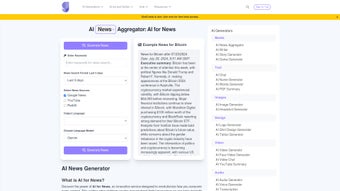
Whether you are a journalist on a tight deadline, a marketer looking for fresh content ideas, an educator preparing classroom material, or simply a curious professional who wants a concise briefing on a niche subject, this web‑based solution offers a seamless, secure, and highly customizable workflow. By entering your chosen keywords, selecting a preferred time frame, and picking from sources such as Google News, YouTube, or Reddit, you receive a polished article that can be exported in multiple formats—all within seconds. The platform also supports over twenty languages, ensuring that global teams can collaborate without the barrier of translation tools.
While the interface may appear feature‑rich at first glance, the underlying design prioritises clarity, allowing users of any technical level to generate precise, multilingual news briefs with confidence. This introduction sets the stage for a deeper dive into the product’s core capabilities, installation process, system compatibility, and the real‑world benefits you can expect.
Overview
AI for News is a cutting‑edge, cloud‑powered web application that transforms raw data from the internet into ready‑to‑publish news articles. The service taps into advanced language models—including Gemini, ChatGPT, and Claude—to understand user intent, extract relevant information, and rewrite it in a natural, human‑like tone. Users begin by specifying a set of keywords or phrases, defining a time window (ranging from the past hour to a custom date range), and selecting one or more content sources.
The platform then aggregates articles, videos, and forum discussions, runs them through a summarisation engine, and produces a coherent narrative that can be tailored for length, style, and depth. Multilingual generation is a standout feature; the AI automatically translates and adapts content into more than twenty languages while preserving context and nuance. Security is baked into every step: all data travels over HTTPS, is encrypted in transit, and is only retained for a short period to respect privacy regulations such as GDPR and CCPA.
Although the tool is web‑only and requires an internet connection, it offers continuous background updates to its AI models, guaranteeing that users benefit from the latest improvements without manual intervention. In practice, AI for News dramatically reduces research time, eliminates the need for separate translation services, and delivers consistent quality across diverse topics—making it an indispensable ally for anyone who needs accurate, timely news content without the usual overhead.
Key Features & Capabilities
The true power of AI for News lies in its thoughtfully designed feature set. Each capability has been engineered to address a specific pain point in the content creation workflow, from initial data gathering to final export. Below is a comprehensive look at what the platform offers, followed by a deeper explanation of how each element enhances productivity and accuracy.
- Custom Keyword Input: Define exact phrases or topics you want the AI to explore, ensuring laser‑focused results.
- Time‑Frame Filtering: Choose a specific date range—last hour, day, week, or custom period—to keep content fresh and relevant.
- Multiple Source Integration: Pull articles from Google News, YouTube transcripts, and Reddit threads, guaranteeing diverse viewpoints.
- Multilingual Generation: Support for over 20 languages, allowing global teams to receive content in their native tongue.
- Model Selection: Switch between Gemini, ChatGPT, or Claude to match tone, depth, and speed preferences.
- Summarisation Engine: AI condenses lengthy articles into concise bullet‑point summaries or full‑length narratives.
- Export Options: Download generated pieces as plain text, PDF, or directly copy to clipboard for immediate use.
- Secure Cloud Processing: All data is encrypted in transit and never stored long‑term, safeguarding user privacy.
- API Access (Future Roadmap): Planned endpoints for developers to embed news generation into custom applications.
Custom Keyword Input eliminates the guesswork that typically accompanies broad searches. By entering precise terms like “renewable energy policy 2024 Europe,” the AI filters out unrelated content and delivers a tight narrative. Time‑Frame Filtering is particularly useful for breaking news; selecting a 24‑hour window captures the latest developments while discarding outdated material.
Multiple Source Integration enriches the final article by blending professional reporting from Google News with community insights from Reddit and visual context from YouTube transcripts. This multi‑source approach reduces bias and provides a more rounded perspective. Multilingual Generation removes the need for external translation services—simply choose the target language and the AI produces a native‑quality article, preserving idiomatic expressions and cultural nuances.
Model Selection offers flexibility: Gemini excels at concise, fact‑driven summaries; ChatGPT shines with engaging storytelling; Claude delivers a balanced mix of both. The Summarisation Engine can output a quick bullet‑point digest for rapid scanning or a full‑featured article for publication. Finally, Export Options ensure that the content can be immediately integrated into any workflow, whether you need a plain .txt file for a CMS, a polished PDF for client presentations, or a quick copy‑paste into a Slack channel.
Together, these features make AI for News a versatile, secure, and future‑ready tool for modern information professionals.
Installation & Usage Instructions
Step‑by‑Step Setup
Because AI for News operates entirely in the cloud, there is no traditional software download or installation required. The only prerequisite is a stable internet connection and a modern web browser (Chrome, Firefox, Edge, Safari, or any Chromium‑based mobile browser). Follow these steps to start generating articles within minutes:
- Visit the Official Site: Open aifornews.example.com and verify that the page loads securely (HTTPS lock icon).
- Create an Account: Click “Sign Up”, enter a valid email address, choose a strong password, and confirm your email via the verification link.
- Configure Your Preferred Model: In the Settings panel, select Gemini, ChatGPT, or Claude. Each model’s description is provided to help you choose the best fit for your content style.
- Start a New Project: Click “New Project”, give it a descriptive name (e.g., “Q2 Tech Trends”), and input your keywords, source selections, and time frame using the intuitive dropdowns and calendar picker.
- Generate Content: Press the “Generate” button. The platform will fetch source material, run the AI summarisation, and display the output in a preview pane. You can edit inline, request a regeneration, or adjust parameters on the fly.
- Export or Share: Use the “Export” menu to download a PDF, save a .txt file, or click “Copy” to paste directly into your favorite editor, CMS, or communication tool.
Best Practices for Optimal Results
While the interface is designed for simplicity, applying a few strategic practices can dramatically improve the relevance and quality of the generated articles. First, craft specific, unambiguous keywords; a phrase like “global electric‑vehicle market 2024” yields far more focused content than a generic term such as “cars”. Second, combine at least two source types—mixing Google News with Reddit, for example—to capture both professional reporting and community sentiment.
Third, experiment with model selection: Gemini is ideal for concise bullet‑point summaries, ChatGPT for narrative depth, and Claude for balanced factuality. Fourth, leverage the custom time‑frame feature when tracking fast‑moving events; a 6‑hour window ensures you receive the freshest updates without outdated filler. Finally, always perform a quick fact‑check on highly regulated topics (e.g., medical or financial news) before publishing, as AI models may occasionally generate plausible‑sounding but inaccurate statements.
By adhering to these guidelines, you’ll maximize the tool’s efficiency, maintain high editorial standards, and fully exploit the platform’s multilingual and multi‑source capabilities.
Compatibility, Pros & Cons
AI for News runs on any operating system that supports a modern web browser, including Windows 10/11, macOS Monterey and later, major Linux distributions, Android 8 and above, and iOS 13 and later. Its responsive design automatically adjusts to desktop monitors, tablets, and smartphones, delivering a consistent experience across all devices.
Pros
- Fast, AI‑driven article generation reduces research time by up to 80%.
- Multilingual support empowers global teams without additional translation tools.
- Customizable source selection ensures content relevance and diversity.
- Secure, encrypted processing protects sensitive research queries.
- Free tier available with generous daily limits; premium plan adds API access and higher quotas.
- Automatic model updates keep the AI at the cutting edge without user intervention.
- Export options (PDF, TXT, clipboard) streamline integration into existing workflows.
Cons
- Limited to three primary sources (Google News, YouTube, Reddit); niche publications may be omitted.
- Interface can feel dense for first‑time users—requires careful parameter setup.
- Advanced features such as API access are only available on paid plans.
- Dependence on internet connectivity; offline usage is not possible.
- Generated content may need fact‑checking for highly regulated topics.
- Export customization is currently limited to PDF and plain text formats.
Frequently Asked Questions
Below you will find answers to the most common queries about AI for News. Each response is crafted to help you quickly determine whether the platform meets your specific needs.
Can I use AI for News on mobile devices?
Yes. The platform is fully responsive and works on Android and iOS browsers. All features—including keyword entry, source selection, and export options—are accessible from smartphones and tablets.
Is there a free version, and what are its limits?
AI for News offers a free tier that allows up to 20 generated articles per day and access to all three source types. Premium subscriptions increase quotas, add API access, and provide priority processing.
How does the tool ensure the privacy of my search queries?
All data is transmitted over HTTPS and encrypted at rest for a maximum of 24 hours. The service does not retain query histories beyond the active session, complying with GDPR and CCPA standards.
Can I choose which AI model generates the article?
Absolutely. In the Settings menu you can select Gemini, ChatGPT, or Claude. Each model has distinct strengths, allowing you to tailor output style, length, and factual depth.
What languages are supported for content generation?
The platform supports more than 20 languages, including English, Spanish, Mandarin, German, French, Portuguese, Arabic, and Japanese. Language selection is made per project, and the AI adapts its summarisation accordingly.
Conclusion & Call to Action
In an era where every second counts, AI for News stands out as a powerful ally for anyone who needs timely, accurate, and multilingual news content without the overhead of manual research. By integrating leading AI models with real‑time source aggregation, the platform delivers a seamless experience that accelerates content creation, reduces operational costs, and maintains high editorial standards. The free tier provides ample capacity for individual users and small teams, while the premium offering unlocks API access and higher quotas for enterprises seeking to embed AI‑generated news directly into their products.
Although the current source list is limited to three major platforms and the UI could benefit from a more guided onboarding flow, these are relatively minor trade‑offs compared with the overall value proposition. Whether you are drafting a daily briefing for executives, curating industry insights for a newsletter, or simply staying ahead of the news curve, AI for News equips you with the tools to do so securely and efficiently. Don’t let information overload slow you down—leverage AI for News today and transform the way you consume and distribute news.
Start your free account now and experience the speed, security, and multilingual power of AI‑driven news generation. Join thousands of professionals who have already streamlined their research workflow and stay ahead of the story curve.



.png)



